eFootball (All Platforms)

Daft question, how would I start an J league with original players, I cant seem to get out my Scottish league with myclub players, there is no obviuos option to start a new game, cheers.
On main menu go to Contracts> Standard player and buy the players using gp. Filter club teams that you want.
You have to change team in myleague to start a new season with different team
 
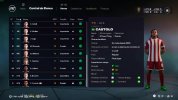
New temporary Master League added. Not played it yet but I'm happy to see the boys again. (Castolo, Minanda, Valeny)

I started a new Free to Play account on Sunday, and honestly I don't think the pay gap is too big with the starter cards they gift you. Already made it to Div 2, and beat some P2W whales from Div 1 convincingly.

So many of the online players just play on auto-pilot. Pumped through balls, immediate 1-2s to central strikers. It's so easy to read.


My ideal would be manual aiming with some assistance on power to avoid those extremely underhit 5 yard passes that happen from time to time.

The biggest disadvantage on manual is you have to hold on to the ball a little longer, where as in real life you can make a quick 5 yard pass without any backlift or delay. I'd like it better if you could increase the power sensitivity.

What would be a good incentive is making the less assisted levels have faster pass trajectories. So on PA3/PA4 you can gain an advantage from using more difficult controls rather than penalised. This used to be true for manual shooting in PES, or at least used to be.

Also miss the feature that let you play a manual L2 pass on any level of pass assistance.
 
New temporary Master League added. Not played it yet but I'm happy to see the boys again. (Castolo, Minanda, Valeny)
To be honest, I'm having more fun playing the fc 26 manager career with the create a club option than this master league inspired event or my league.
I edited the stats of the default players that look like the original pes players. If you adjust the gameplay and ignore the bugs and the missing features compared to master league, it's a fun game.
2026-08-10_21-18-29.jpg

Just my opinion, though.
 
Holy Shit.
https://github.com/jlrouzies-fr/DLSS5-Feeder

DLSS 5 for any game even if its not Supporting DLSS.

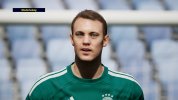
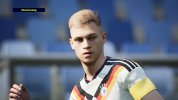
I tested it and its crazy. This is no fake and its playable.

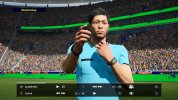
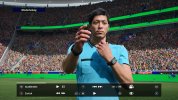
eFootball_2026_08_30_14_18_40_919.jpgeFootball_2026_08_30_14_18_41_849.jpgeFootball_2026_08_30_14_18_51_778.jpgeFootball_2026_08_30_14_18_52_769.jpgeFootball_2026_08_30_14_18_59_564.jpgeFootball_2026_08_30_14_19_00_584.jpgeFootball_2026_08_30_14_19_10_045.jpgeFootball_2026_08_30_14_19_10_650.jpg

eFootball_2026_08_30_16_36_00_594.jpgeFootball_2026_08_30_16_36_01_957.jpg

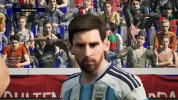
NR_CAPTURE_1788108636137_9_NR_OFF.jpgNR_CAPTURE_1788108636137_9.jpg

Also check out the fans behind Messi.

Got around 100 FPS on WQHD in the gameplay cam and about 80 in this Face zooms.
RTX 5080

Edit: Smooth Motion is working too, so i got my 165 FPS 😅
 
Last edited:
Holy Shit.
https://github.com/jlrouzies-fr/DLSS5-Feeder

DLSS 5 for any game even if its not Supporting DLSS.

I tested it and its crazy. This is no fake and its playable.

View attachment 443359View attachment 443360View attachment 443361View attachment 443362View attachment 443363View attachment 443364View attachment 443365View attachment 443366

View attachment 443391View attachment 443392

View attachment 443412View attachment 443413

Also check out the fans behind Messi.

Got around 100 FPS on WQHD in the gameplay cam and about 80 in this Face zooms.
RTX 5080

Edit: Smooth Motion is working too, so i got my 165 FPS 😅
Is there a guide on how to install it? I’ve ran around trying to find the files, but can’t seem to find them in one place.
 
Is there a guide on how to install it? I’ve ran around trying to find the files, but can’t seem to find them in one place.
You dont need the release from github anymore.

Install Reshade with addon support and put these files into the exe folder:

https://pixeldrain.com/u/d1oUawf3

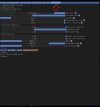
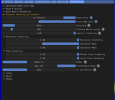
With the home key you can bring up the reshade menu. There is a tab called RenoDX.
Open DLSS neural Rendering.
For games without DLSS you have to set the Hook point to the right (On Present) and Force NGX core on.
Thats it. You can configure the visuals there too.
 
Last edited:
You dont need the release from github anymore.

Install Reshade with addon support and put these files into the exe folder:

https://gofile.io/d/e3a5f72c-1346-484c-a9c3-1cf8acfc086e

With the home key you can bring up the reshade menu. There is a tab called RenoDX.
Open DLSS neural Rendering.
For games without DLSS you have to set the Hook point to the right (On Present) and Force NGX core on.
Thats it. You can configure the visuals there too.
"Content not publicly accessible" when trying to access that link. (I've just read that you don't have ghosting on the latest version and I'm eager to try it, because I've got awful ghosting on my 4070 Super and the pitch turns into a liquid!
 
"Content not publicly accessible" when trying to access that link. (I've just read that you don't have ghosting on the latest version and I'm eager to try it, because I've got awful ghosting on my 4070 Super and the pitch turns into a liquid!
Sry, my bad.
Try again. Make sure to delete all the old DLSS 5 Stuff.
A ton of new settings too.
 
Sry, my bad.
Try again. Make sure to delete all the old DLSS 5 Stuff.
A ton of new settings too.
Thank you! If removing all pre-existing DLSS 5 files, uninstalling Reshade and then reinstalling again, then I install the files you've provided to the EXE folder, the DLSS 5 add-ons don't appear on the list (when pressing the Home key in-game) - so I guess there's more than just these three files needed?

EDIT: Ah it looks like you also need a "vector provider", as well as the Renodx .fx file to place into the "shaders" folder?
 
Last edited:
Thank you! If removing all pre-existing DLSS 5 files, uninstalling Reshade and then reinstalling again, then I install the files you've provided to the EXE folder, the DLSS 5 add-ons don't appear on the list (when pressing the Home key in-game) - so I guess there's more than just these three files needed?

EDIT: Ah it looks like you also need a "vector provider", as well as the Renodx .fx file to place into the "shaders" folder?
No, you dont need a vector provider. Only these Files with Reshade Addon are needed.
Its not in the list, its a tab now.

re.jpg
 
No, you dont need a vector provider. Only these Files with Reshade Addon are needed.
Its not in the list, its a tab now.

View attachment 443488
Woahhhhh. My ghosting has almost entirely gone! This is fantastic, thank you so much.

It is so close to working at 4K 30fps when enabling "Smooth Motion", but it introduces really bad tearing. I'm going to have to go back to 1080p 60fps and see how that works, but either way, this is a huge improvement!
 
You dont need the release from github anymore.

Install Reshade with addon support and put these files into the exe folder:

https://pixeldrain.com/u/d1oUawf3

With the home key you can bring up the reshade menu. There is a tab called RenoDX.
Open DLSS neural Rendering.
For games without DLSS you have to set the Hook point to the right (On Present) and Force NGX core on.
Thats it. You can configure the visuals there too.
Hey I get a 404 on that link, just me? Thanks.
 
nvngx_dlss.dll, nvngx_dlssnr.dll and renodx-dlss.addon64 are all in the same folder as the exe?
Exe folder is eFootball\eFootball\Binaries\Win64
 
I'm really intrigued to know how you got it running smoothly. I have a 5070 TI, can handle most things easily, but boy is this chugging! Anyone playing it in 4K or is that a no-go?
 
I'm really intrigued to know how you got it running smoothly. I have a 5070 TI, can handle most things easily, but boy is this chugging! Anyone playing it in 4K or is that a no-go?
you can try to scale your 4k monitor to 1440p resolution and see if it work better

on my 4k monitor I play Football Life 2026 with 1440p res. with FSR ( FidelityFX super resolution) by AMD, the counter part (with different approach) of this DLLS by nvidia, and results are very good on my pc...
 
Last edited:
you can try to scale your 4k monitor to 1440p resolution and see if it work better

on my 4k monitor I play Football Life 2026 with 1440p res. with FSR ( FidelityFX super resolution) by AMD, the counter part (with different approach) of this DLLS by nvidia, and results are very good on my pc...
Same here in terms of resolution. 4K at 30fps would work great with my RTX 4070 Super if not for the fact that I connect it up to the TV via a Samsung soundbar that has fairly outdated HDMI throughput, which I think is the reason why I can't solve the screen tearing at that resolution.

But 1440p is smooth as silk at 60fps with no tricks needed (e.g. enabling "smooth motion" within NVIDIA control panel). @Bogo36's guide really helped me out.
 
4K at 30fps would work great with my RTX 4070 Super...

But 1440p is smooth as silk at 60fps with no tricks needed (e.g. enabling "smooth motion" within NVIDIA control panel).
always better to play at 1440p on 4k monitor but with 60 fps using this type of technology, respect than a full 4k res. at 30fps only. ;)
30fps never good for a right gameplay approach...
 
For RTX 4000 series is the same process? I tried it and works fine and looks awesome!! Is literally night and day! But experienced some crashes to desktop after playing some minutes.... Anyway here's how it looks in a RTX 4080 super :APPLAUD:

Here a gameplay of a whole match. Is quite impressive how it even enhance the appearance of the audience in the background and the grass too.
 
Last edited:
Back
Top Bottom