eFootball PES 2021 Discussion Thread (PC)

Hi everyone! I’m a total newbie when it comes to modding and game files. I’m playing SP Football Life 2026 and I’d like to add custom chants for Red Star FC (France). I already have the video source to cut the audio from, but I have no idea where to put the files or how to register them in the game config. Also, do I need any additional mods or tools to make this work? Any help would be greatly appreciated!
 
Hi everyone! I’m a total newbie when it comes to modding and game files. I’m playing SP Football Life 2026 and I’d like to add custom chants for Red Star FC (France). I already have the video source to cut the audio from, but I have no idea where to put the files or how to register them in the game config. Also, do I need any additional mods or tools to make this work? Any help would be greatly appreciated!
there is "Editing section PES2021" of the forum for you search about... an for questions about football life the thread is this one...
 
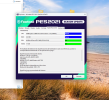
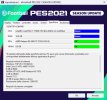
Hi everyone, I bought an Nvidia RTX 5060 graphics card, but in the game settings everything should appear as good, however it shows as OK, as if it were my old AMD RX 580. This affects the game's performance because sometimes it runs too fast. Is there any way to configure the graphics card so that everything appears as good?
 

Attachments

  • Captura de pantalla 2026-03-14 203144.png
    Captura de pantalla 2026-03-14 203144.png
    853.9 KB · Views: 0
Hi everyone, I bought an Nvidia RTX 5060 graphics card, but in the game settings everything should appear as good, however it shows as OK, as if it were my old AMD RX 580. This affects the game's performance because sometimes it runs too fast. Is there any way to configure the graphics card so that everything appears as good?

It’s just a cosmetic issue with the PES app settings… it clearly struggles to recognise the latest generationd of graphics cards, but what you see there doesn’t affect the game’s settings… that screen is just there to tell you that the hardware is compatible, and that’s all… I’ve got the same screen too, even also my AMD graphics card is from a newer generation than when the game was released.


1773527339850.png

one or two times it was exit with all blue, on Good, ma most times it's as in image above

Apart from this settings detection bug... you can increase GPU usage by increasing the filters in your GPU's control panel for the game pes2021.exe. And in your Windows settings, under the “Games” section, set your graphics card as the GPU to be used for the game.
 
Last edited:
It’s just a cosmetic issue with the PES app settings… it clearly struggles to recognise the latest generationd of graphics cards, but what you see there doesn’t affect the game’s settings… that screen is just there to tell you that the hardware is compatible, and that’s all… I’ve got the same screen too, even also my AMD graphics card is from a newer generation than when the game was released.


View attachment 409622

Apart from this settings detection bug... you can increase GPU usage by increasing the filters in your CPU's control panel for the game pes2021.exe. And in your Windows settings, under the “Games” section, set your graphics card as the GPU to be used for the game.

Thanks friend for the reply
 
Does anyone have any recommendations for gameplay mods.
Been playing the PES 99 patch but since playing the game it has several issues which I am sure gameplay mods could fix.
They also need to be MODs and not EXE files, as PES99 uses it's own .exe

1. Better GK's they are very poor on PES 21 or maybe it is the CPU on the higher skill levels just exploit the game engine.
2. Is there anyway to increase the responsiveness of players, the players seem to take an age to control the ball or release the ball in what I would consider a normal manner.
3. Can you stop the free kicks? The AI scores free kicks from pretty much anywhere with any half decent free kick taker - Yes I can take Beckham scoring but Bergovic scoring 2 out of 2 for West Ham is not good.
4. Strange request but does anyone have a formation I can try which is more realistic and scores goals. At present i am playing 3-2-5 as this is the only way I have been able to score goals and win games on higher skill levels but also makes the game pretty unrealistic.
 
Hola, tengo FL25 y en la instalación las faces vienen en archivo cpk, yo las quiero en sider ya que me es mas facil poder cambiarlas, las descomprimo de los cpk las meto en carpeta faces y tal( todo bien hecho ya que lo he hecho muchas veces), quito los cpks de la carpeta download y al entrar en el juego se me queda colgado. No se que hacer mas ni como hacerlo. Gracias
 
Any mod to improve headers? It’s so hard to score headers from corners both for me and the ai opponent. Or is there a way to edit it in dt18? Been messing around with the file, so far nothing works.
 
GoodNight Guys, Do you know of any mod that changes the structure of the Copa do Brasil in Master League? Why does it start at the beginning and end before the Brazilian Championship, instead of lasting the entire calendar?
 
Hello everyone. I wanted to ask if there is a facemaker here who could possibly help me to adjust a face.
 
Is there a way to set positions "By Ability" globally, or do i have to do it for every team?

I installed Klashmann's tactics and it's a great effort but there are many players out of position.
 
Hello everyone. Since PES 2021 can no longer be purchased, I had to download the CPY version. Just like with FL 26 and Virtua Red, I’m trying to launch it with set affinity and Process Lasso to avoid the crash issue on Intel processors, but it doesn’t work with the ISS 96-97 patch. I tried using only CPU 0 from Task Manager, but it didn’t help. I also tried ranges like 0–7 depending on the core count, still no luck. I tested it through Process Lasso as well, but the game still crashes. On Virtua Red, it was launching without crashing using this method.

Is there any solution for this, or does ISS 96-97 simply not work on the CPY version?

The 96-97 patch launches with the CPY version. Kits, squads, and everything else appear fine without any issues, but after pressing “Start Match,” the game closes right when the loading finishes and it’s about to enter the match screen.
 
Good evening everyone… I wanted to ask for some information… I bought a very powerful, next-gen gaming laptop (I won’t list the specs here), but I’m having major trouble launching PES 2021 and FL26… I managed to get them working by lowering the screen resolution (dropping from 2560... to 1920x1080) and running the games in windowed mode… but isn’t there another way to run the games while making full use of the PC’s capabilities?… It seems like the PC just can’t “communicate” with the game… Thanks a lot to anyone who can help! 😊
P.S. I forgot to mention that I’ve already assigned the Nvidia graphics card to FL26 via the control panel.
 
Good evening everyone… I wanted to ask for some information… I bought a very powerful, next-gen gaming laptop (I won’t list the specs here), but I’m having major trouble launching PES 2021 and FL26… I managed to get them working by lowering the screen resolution (dropping from 2560... to 1920x1080) and running the games in windowed mode… but isn’t there another way to run the games while making full use of the PC’s capabilities?… It seems like the PC just can’t “communicate” with the game… Thanks a lot to anyone who can help! 😊
P.S. I forgot to mention that I’ve already assigned the Nvidia graphics card to FL26 via the control panel.
Hey @enk, in the settings.exe of the game, can you see what graphics card the game is reading ? we start from there first
 
Hi Dragovic... at first it was reading the integrated graphics, but I forced it to use the Nvidia card; the game launches, but only if I lower my screen resolution from 2560x1600 to 1920x1080 (which is the native resolution for PES 2021) and run it in windowed mode... and that's absurd... thanks for your reply... :)
 
Hi Dragovic... at first it was reading the integrated graphics, but I forced it to use the Nvidia card; the game launches, but only if I lower my screen resolution from 2560x1600 to 1920x1080 (which is the native resolution for PES 2021) and run it in windowed mode... and that's absurd... thanks for your reply... :)
is there any kind of error that you're facing or see if the process is running in the task manager ?

Also, what CPU is it because I remember FL gave some issues on newer Intel CPUs
 
--at first it was reading the integrated graphics, but I forced it to use the Nvidia card; the game launches, but only if I lower my screen resolution from 2560x1600 to 1920x1080 (which is the native resolution for PES 2021) and run it in windowed mode... and that's absurd... thanks for your reply... :)
HI, set your PES2021 and FL26 settings.exe with your native monitor resolution (2560x1600) but flagged as "Window mode"

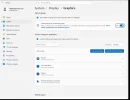
then go on windows Settings > System > Display > Graphics:

1784734582290.webp
flag all as in above image then click on Add desktop app... browse to your PES2021.exe (make the same for your FL_2026.exe)

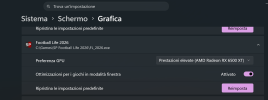
once you added your exe, set it to be used by your Nvidia card as High Performance mode; then enable it to be optimized for Window Mode (make the same for your FL_2026.exe):

1784736754741.png

Now your games are optimized to be launched in windows mode to native resolution of your Display but with borders that isn't a beautiful way

So now you can download this app:

NoMoreBorder...

set your exe inside the app (be sure the app is open before launch the game but it will work also after once setted for your windowed game)


now your games should works to "full screen" and max resolution without any borders

PS: playing on windows mode but without borders with this type of app it should be better in many games also for performances to avoid some stuttering issue that can happens some times in default Windows full screen mode...
 
Last edited:
Back
Top Bottom